【Video】All-in-one Guidance: Manage Your TikTok Shop Products Easily.

Merchants need to complete the shipping fees template before uploading products, otherwise they will receive a reminder when uploading the product.

img_v2_c54cb68c-4ca7-4ed8-8fda-30a07aef332g.pngimage.png

Single Upload Product

  • Entrance
  • Entrance ①
Seller Center->Product->Manage Product->Add new product
  • Entrance ②
Seller Center->Product->Add new productimage.png
  • Describe what you are selling
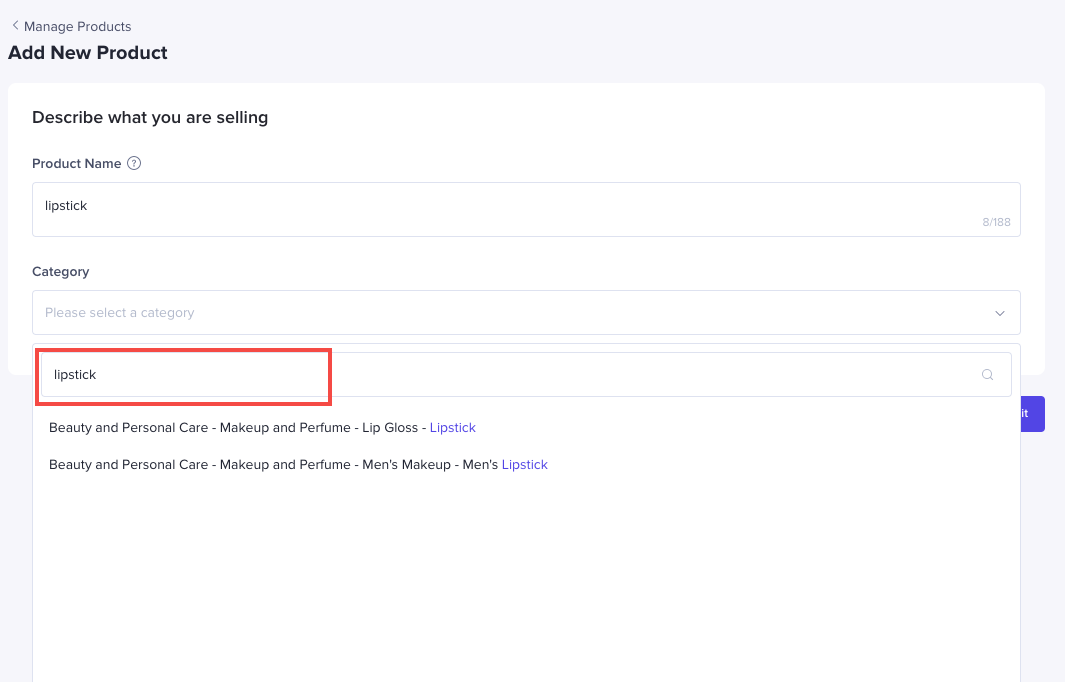
  • Product name
  • No more than 188 characters
  • Category
  • You can enter keywords to search categories
  • Different category selections will determine the scope of other information
  • Products need to comply with the sale rules of TikTok Shop
  • UK TikTok Shop Prohibited Products Guidelines
  • UK TikTok Shop Restricted Products Guidelines
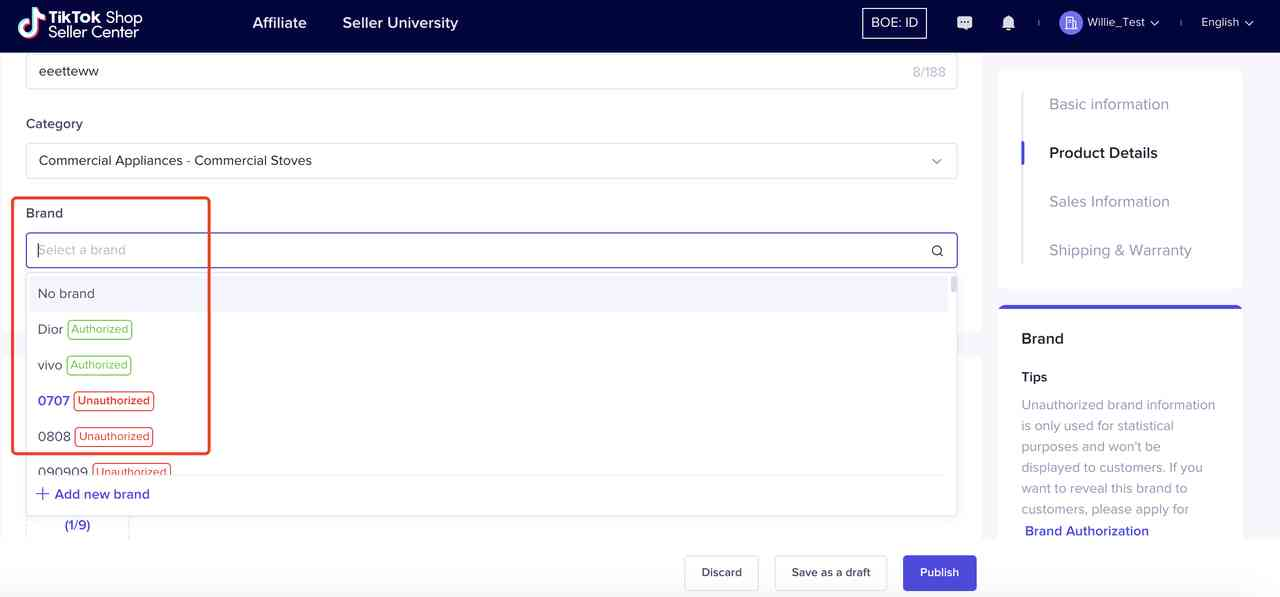
  • Brand
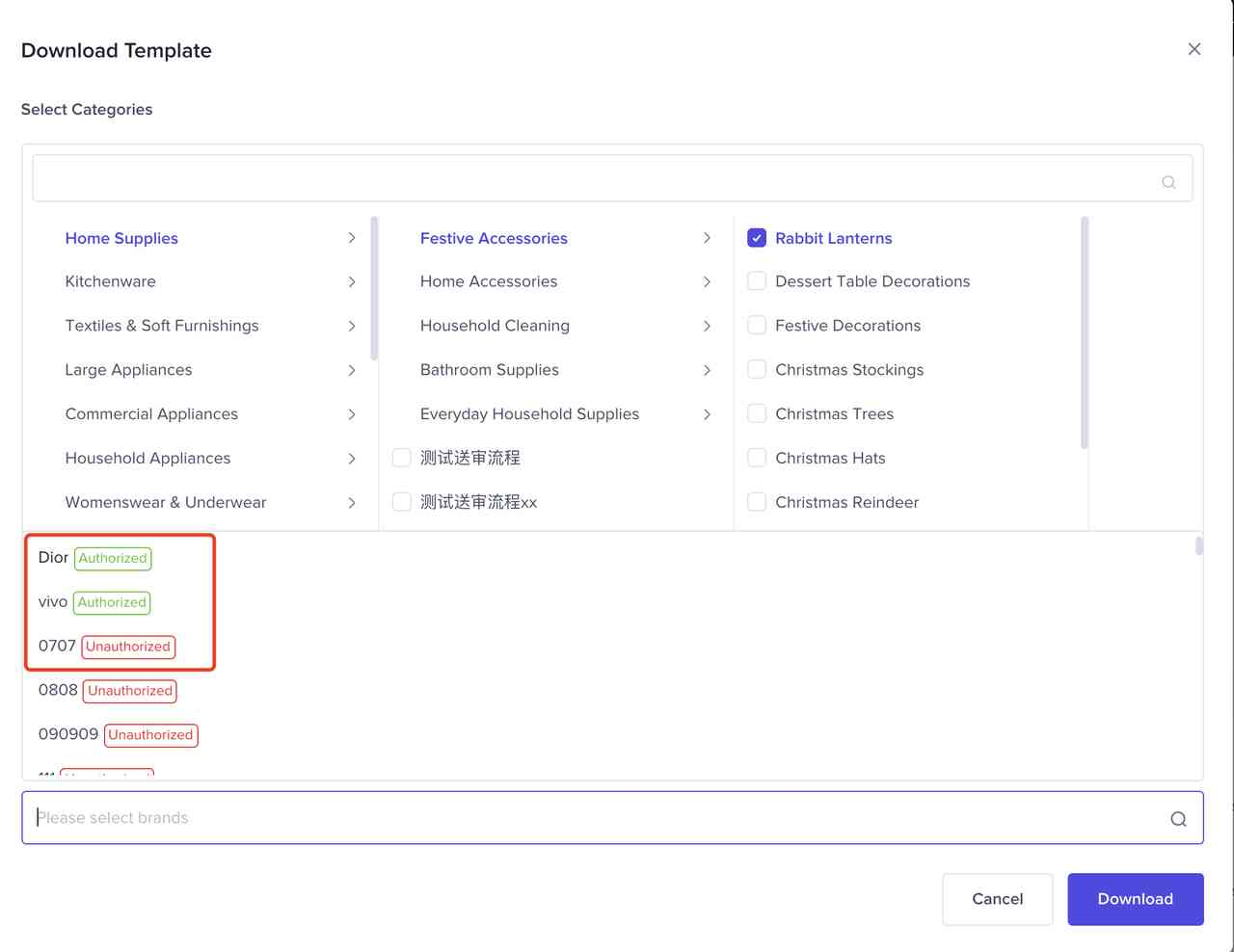
  • For branded products, sellers can search by keywords and quickly select from the brand pool of the platform. The brand selected here is not limited to qualifications. If the brand exists in the brand pool and is not a high-risk brand, it can be selected.
  • For brand qualifications that have been submitted for review, the word ‘Authorized’ is displayed under the brand, and buyers will see the brand on the product details page.
  • For brand qualifications that have not been submitted for review, the word ‘Unauthorized’ will be displayed under the brand and will not be revealed on the buyer-side.image.pngimage.png
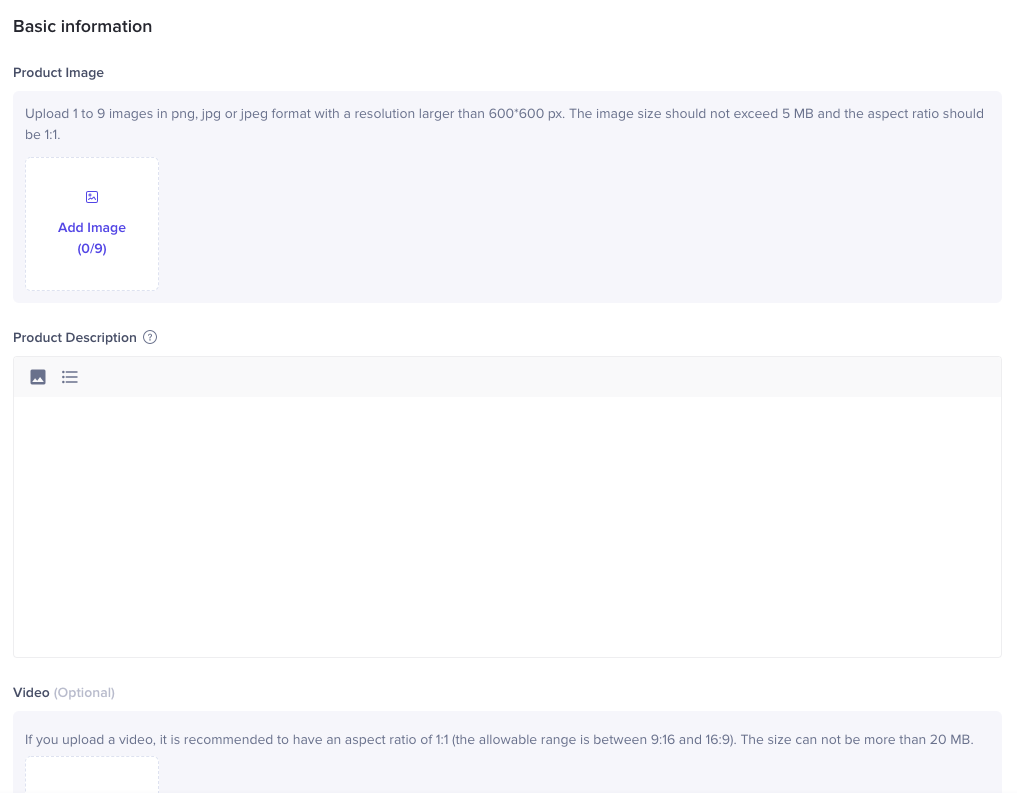
  • Basic Information
  • Please fill out product information accuratelyimage.png
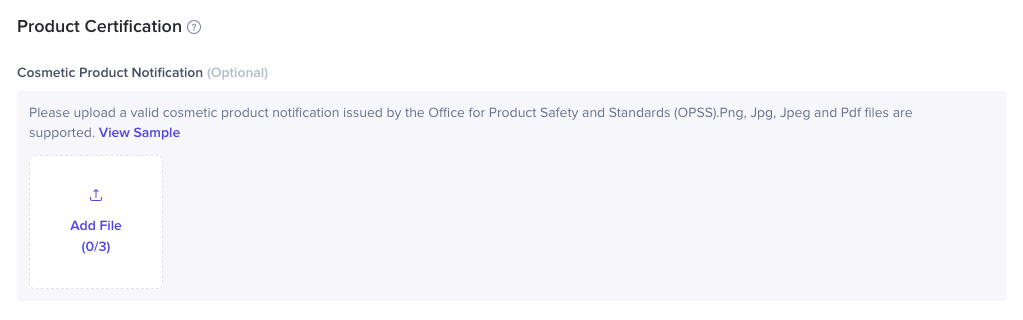
  • Product Certification
  • Some categories require uploading some certificate or qualifications. Please refer to the page prompt and upload the corresponding document.image.png
Report Example
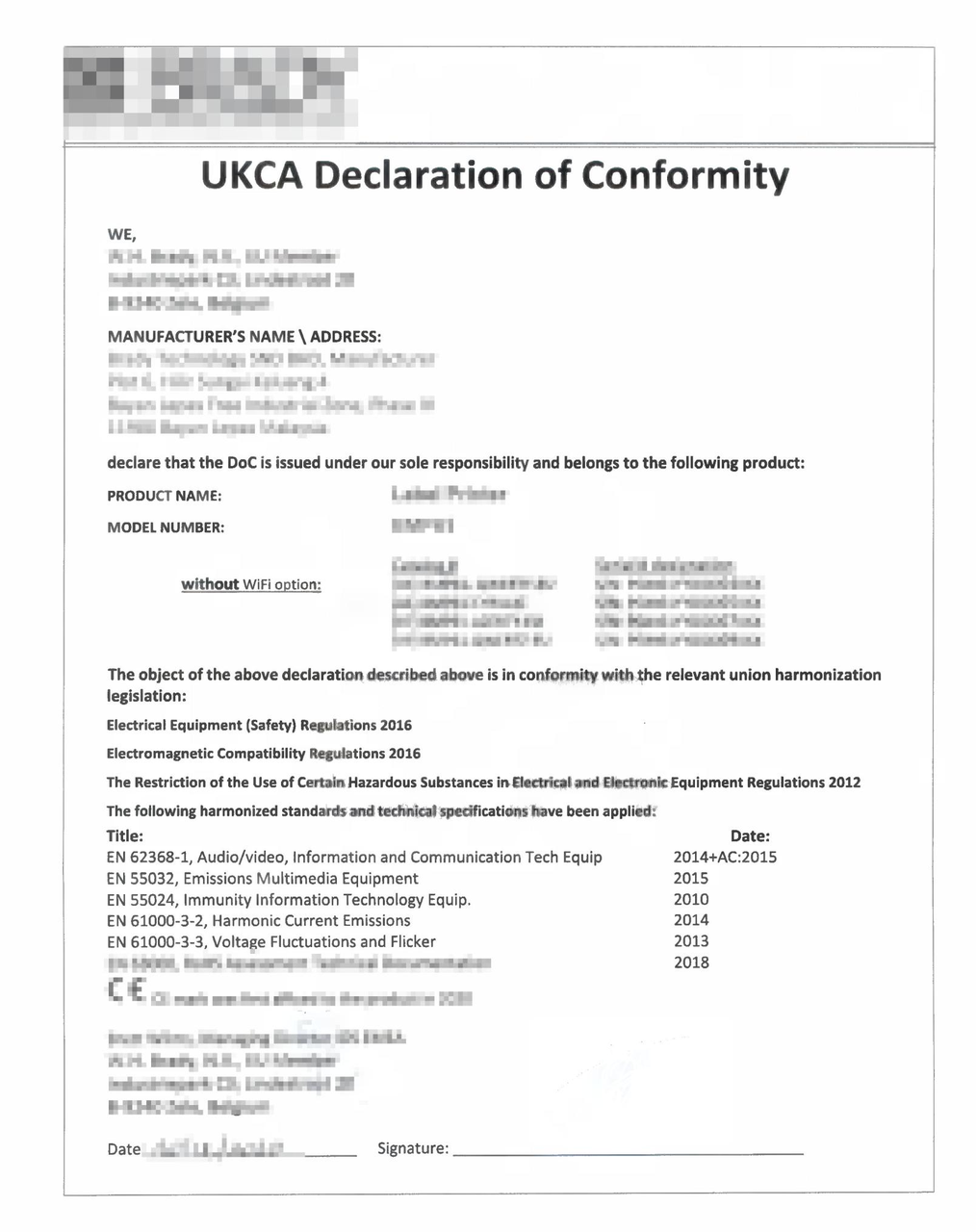
  • UKCA Declaration (e.g. Children's toys)image.png
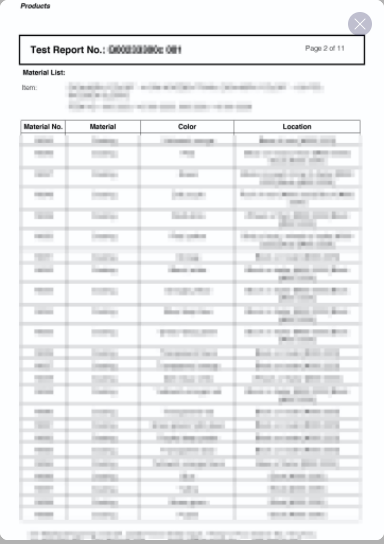
  • Test repot (e.g.Jewelry, watches, and accessories)image.png
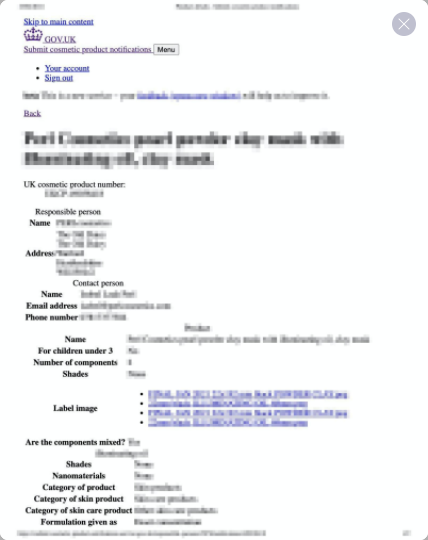
  • Cosmetic product notification (e.g. Beauty and personal care products)image.png
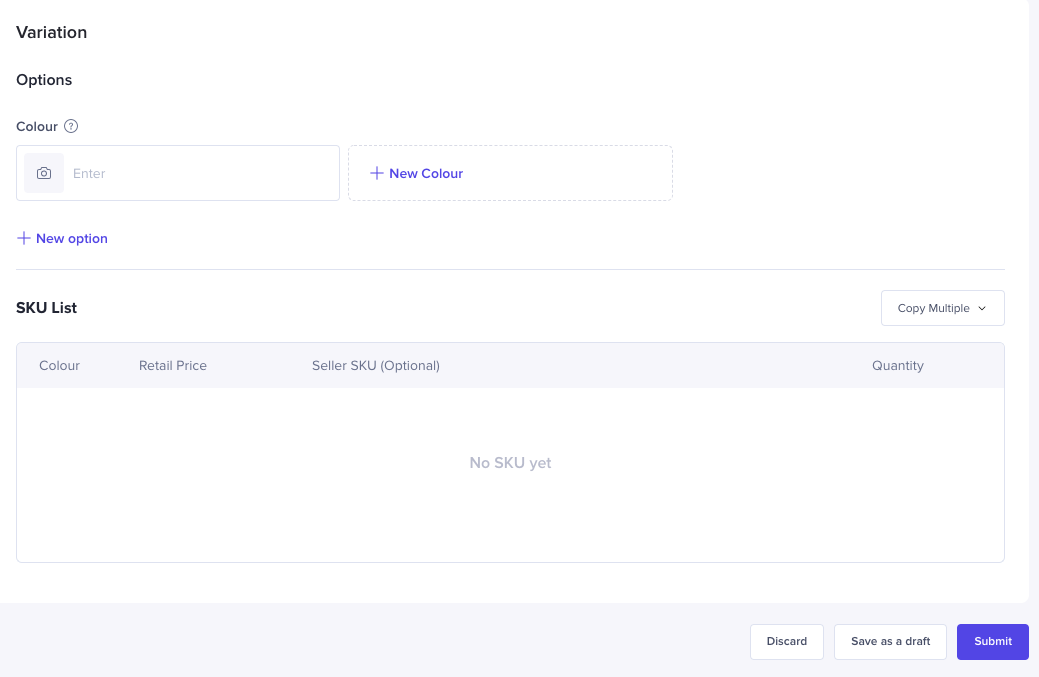
  • Variation
  • Variation
  • Variation refers to the variables that affect the price of the product, such as color, size, etc
  • Specification value refers to the specific options of a variable, such as red, black, white, etc
  • You can add new specs and name the specs value
  • SKU list
  • All SKU lists are automatically generated after the variations are set
  • Seller SKU (optional) refers to the merchant's own internal SKU number, which can help the merchant to sort out the products
Quantity is where to fill in the inventory quantity of each itemProduct Identifier CodeThe product identifier codes are part of a system of unique identifiers called GTINs, or Global Trade Item Numbers. The most common GTINs used are Universal Product Codes (UPCs), International Standard Book Numbers (ISBNs), European Article Numbers (EANs). The product identifier code you fill in should be registered with the GS1 database. Certain product categories require mandatory input for this field. Others remain optional, provided you select a valid reason for not inputting the product identifier code.image.png

Batch Upload Products

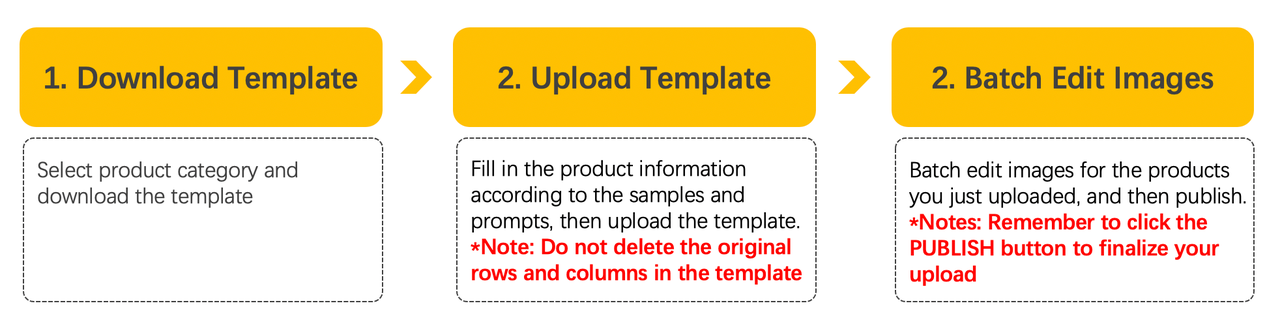
  • Process Overviewimage.png
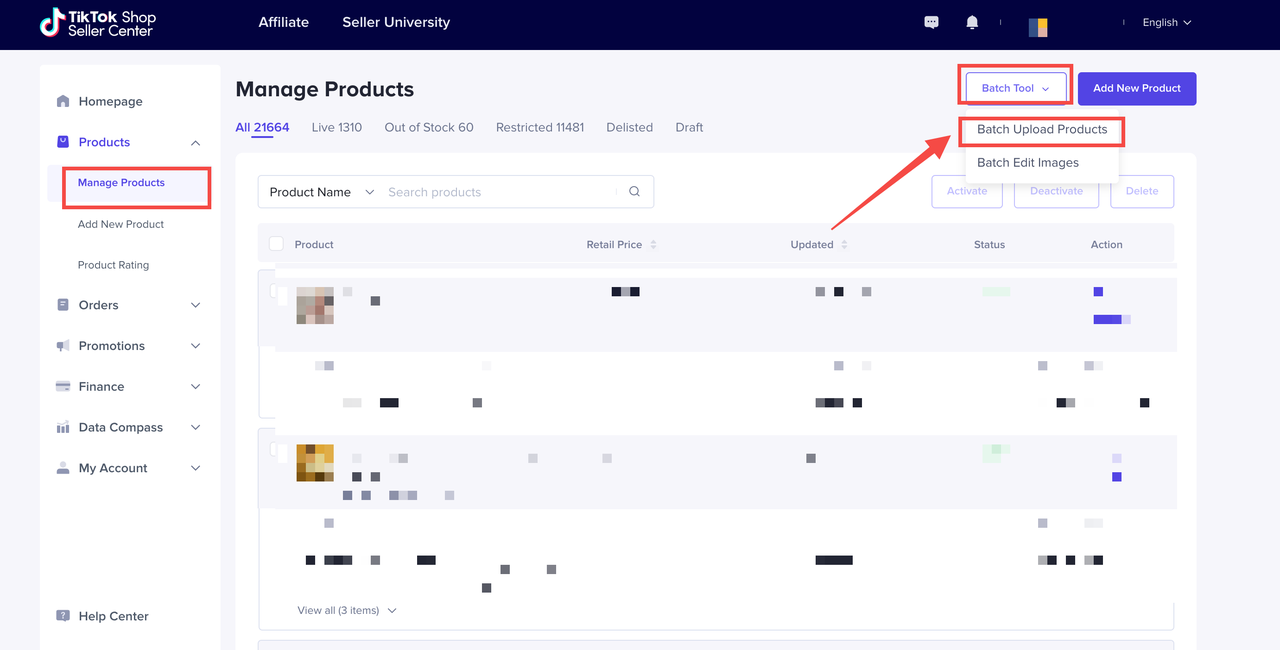
  • Entrance
  • Seller Center->Products->Manage Products->Batch Tool->Batch Upload Productsimage.png
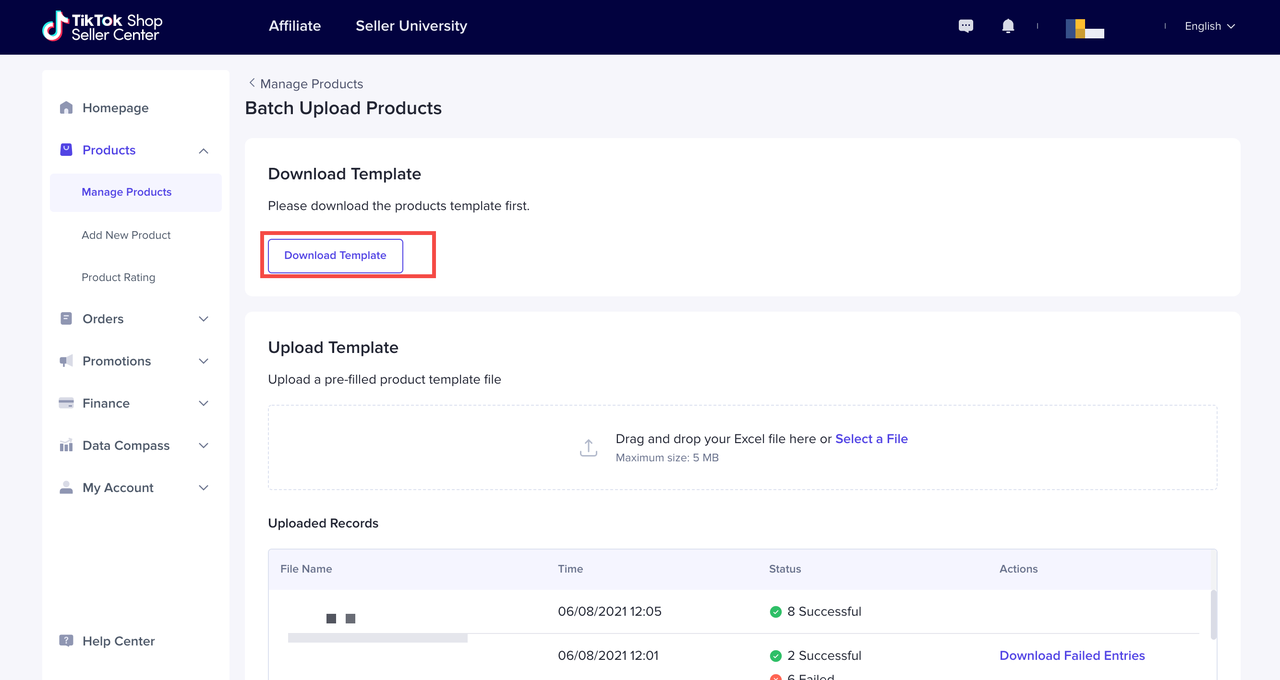
  • Download Template
  • Please search for the target category based on keywords, select the product category and brand to be uploaded, and fill in according to the prompt content of the downloaded template
  • Important: Do not add or delete any rows or columns to the template.image.pngimage.png
  • Template Download ⬇️
Unknown File
  • Fill in Template
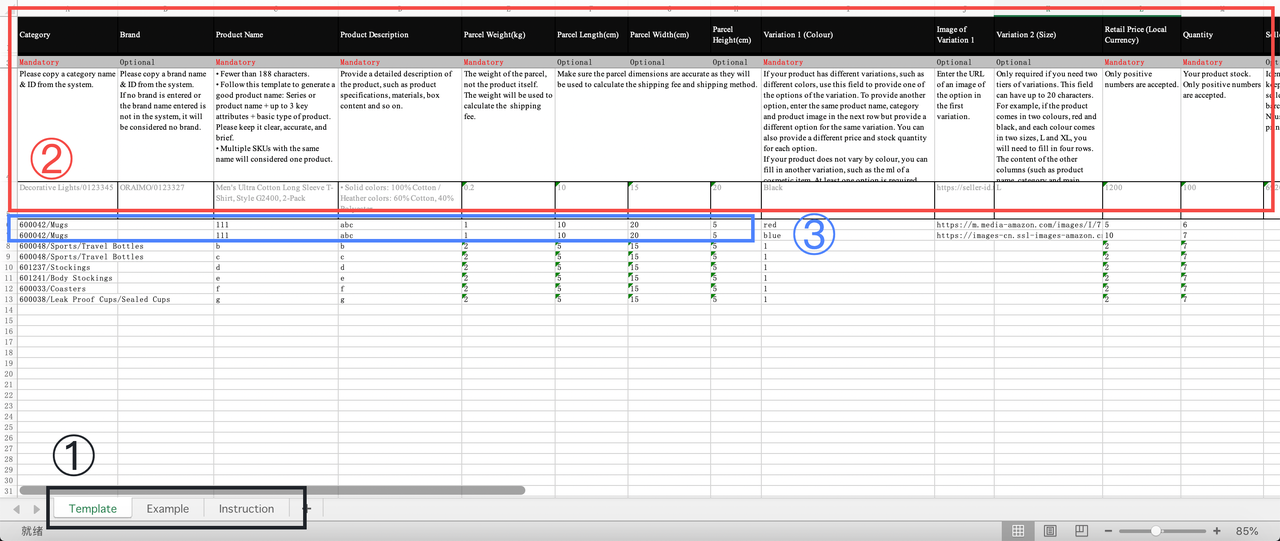
  • 1️⃣ Please refer carefully to the "Instruction" and "Example" sheet, and then fill in the "Template" sheet (the black circled part of the screenshot)
  • 2️⃣ Do not delete the original rows and columns in the template (the red circled part of the screenshot)
  • 3️⃣ When uploading multiple SKUs under the same SPU, each SKU should be divided into one independent row, and the A-H columns (Category, Brand, Product Name, Product Description, Parcel Weight/Length/Width/Height) of all SKUs should be totally the same, so that these SKUs can be automatically merged into one SPU in the system (the blue circled part of the screenshot)image.png
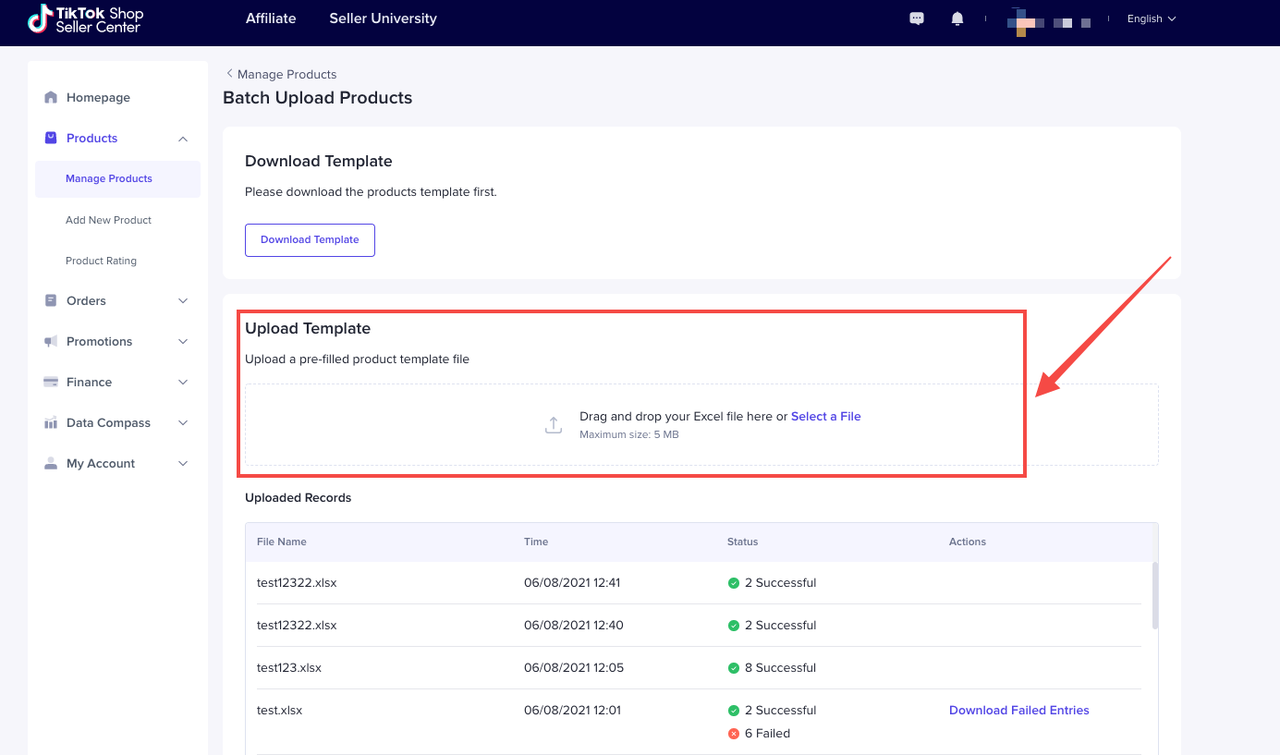
  • Upload Template
  • Upload a pre-filled product template fileimage.png
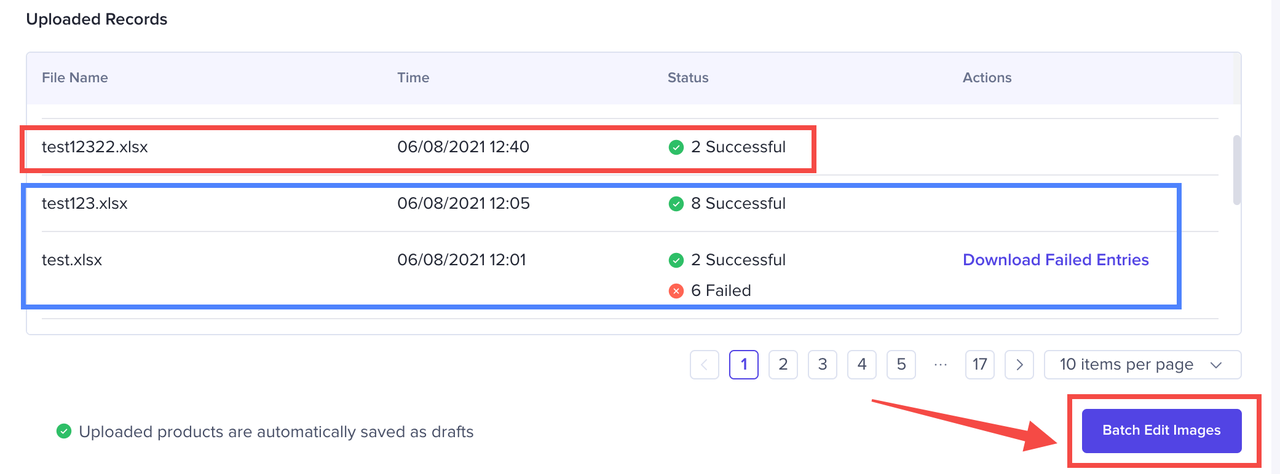
  • Upload Feedback
  • Check the upload feedback
  • If all the products are uploaded successfully, please click "Batch Edit Images" to get to the next step
  • If any product failed to be uploaded, please click "Download Failed Entries" to check the reasons for failure, and follow the prompts to modify and re-upload. After all the products are successfully, uploaded, then click "Batch Edit Images" to move on to the next process
  • Note:
① Duplicate templates can only be uploaded once;② "Failed Entries" only includes the failed products, and the products that have been uploaded successfully do not need to be uploaded again;image.png
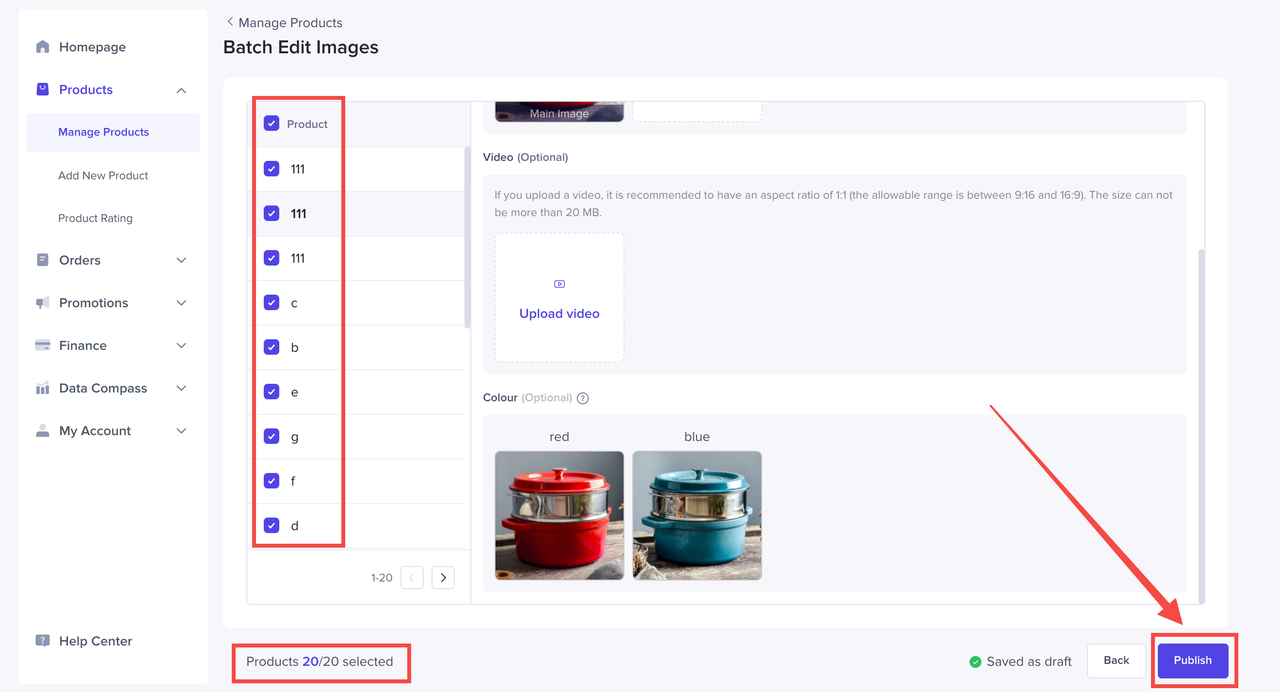
  • Batch Edit Images
  • Batch edit product images and once you've confirmed that the pictures are correct, select items and publish them. image.png
  • Submit
Click "Finish" and wait for approval.

Complying with Product Listing Guidelines

  1. Listing prohibited products on TikTok Shop.
Sellers are prohibited from listing, sharing, or promoting prohibited products on TikTok Shop. Examples of prohibited products include but are not limited to:
Category Description
Firearms, Ammunition, and Weapons
  • Firearms and all associated parts, kits, ammunition, components, and accessories for firearms.
  • Knives or other bladed products.
  • Weapons and other items that are designed to cause harm to individuals.
  • Items that may have the potential to be modified into weapons such as oil filters.
  • Any related tutorials or books with instructions for making firearms, ammunition, and weapons are also prohibited.
Hazardous and Dangerous Items
  • Radioactive materials and equipment to process radioactive materials.
  • Explosive materials and equipment to process explosive materials.
  • Fireworks.
  • Toxic substances and hazardous chemical items.
  • Other hazardous materials or dangerous goods that pose a significant threat to the safety and security of customers, facilities, or the environment.
  • Any related tutorials or books with instructions for making hazardous products.
Human Body Parts, and Human Remains This includes but is not limited to any human body part, human waste, and bodily fluids.
Animals and Animal Products, Protected Wildlife, and Plants
  • Live animals, livestock, and pets.
  • Any animal body parts, or products that contain animal parts or ingredients.
  • Products that are, or contain plants or other wildlife protected by law or regulation.
  • Hunting equipment or any tool that is potentially harmful to animals and humans.
Adult Products and Services Sexually orientated adult products and services.
Discriminatory and Offensive Products
  • Products that reference discrimination, terrorism, terrorist organizations.
  • Products that reference abuse or harassment towards individuals.
  • Products containing violent or offensive material.
  • Products that promote or glorify suicide or people who have been found guilty of violent or sexual crimes.
  • Products related to human tragedies and natural disasters.
  • Books, audio, videos, documents, and materials promoting religious or racial discrimination, or which are prohibited by laws and regulations from being published or sold.
Illegal Drugs and Drug Paraphernalia
  • Illegal Drugs, chemicals, and raw materials.
  • Drug paraphernalia that includes products primarily intended or designed for making, preparing, or using controlled substances .
  • Products that claim to provide a “legal high”.
Security and Privacy
  • Materials containing personal information.
  • Software, equipment, tutorials, and services used to steal private personal data, institutional data, or information.
  • Any other items that infringe upon, or have the potential to infringe upon, an individual’s privacy.
Government and Military Items Items and equipment issued by the government, police, or military.
Coins, Cash, Gift cards and Financial Products
  • Any coins or paper money.
  • Replica or counterfeit coins, stamps, and paper money.
  • Equipment designed to create counterfeit coins, stamps, or paper money.
  • Cash equivalent instruments, gift cards, coupons, gift certificates, electronic stored-value redemption codes, and similar items.
  • Financial products and services, such as stocks and securities
  • Gold, silver, and other precious metal bullion.
  • Products or services that offer the sale or purchase of virtual currencies.
  • Protected art craft and antiques.
Products That May Facilitate Illegal Activity or Dishonest Behaviour
  • Products that may facilitate illegal activities and dishonest behavior.
  • Devices and equipment which may be used for illicit purposes.
  • Gambling and Lottery.
  • Other illegal activities.
Unauthorized / Unqualified Medicines and Medical Devices.
  • Any drug, herbal product, or other product that requires a prescription or must be provided or sold by a doctor or other healthcare provider.
  • Unlicensed medicines and herbal or homeopathic products that make medicinal or health claims. Products that contain Cannabidiol (CBD), other cannabinoids, or hemp.
  • Any veterinarian medicines.
  • Unsafe supplements and dietary supplements.
  • Medical devices and accessories.
  • Any other similar products that are prohibited to be sold under applicable laws and regulations.
  • Medicines that claim can cure COVID.
Other Prohibited Products Any products that are prohibited from the sale (including prohibitions on online sales) according to applicable laws and regulations.
  1. Listing unsupported products on TikTok Shop.Sellers are prohibited from listing, sharing, or promoting unsupported products on TikTok Shop. Examples of unsupported products include but are not limited to:
CategoryDescription
Weight Loss ProductsAny type of weight loss products or body-building supplements.
MedicinesAll types of medicines, including both prescription drugs and over-the-counter drugs.
Medical Devices
  • Any instrument, apparatus, appliance, software, material, or other article intended by its manufacturer to be used, alone, or in combination with other products, for diagnostic and/or therapeutic purposes; or
  • Which requires a prescription, application, fitting, or sale by a doctor, optician, or other healthcare providers.
  • Household medical devices for similar applications, e.g. medical face masks.
Various Food Products
  • Food that requires special storage conditions.
  • Prepackaged food for children under three years old, baby formula (including powder and liquid), nutrition supplements, food additives.
Some second-hand productsUsed underwear, opened beauty and personal care products, and more.
Sex or Adult Products & Services
  • Sex toys and games, erotic clothing, erotic wellness and massage, bondage gear/ accessories, fetish wear, novelty games, sex furnishing, sexual enhancers, or other adult products depicting or suggesting sexual activity.
  • Dating, sexual contact, or escort services, including in-person or online services.
Alcohol, Tobacco, E-cigarettes, and Related Products
  • Alcohol, including all alcoholic beverages.
  • Tobacco, or any product that contains tobacco.
  • Shisha or hookah products.
  • Smoking apparatus, including pipes and rolling papers.
Automotive and Automotive PartsThis includes, but is not limited to:
  • Cars, motorcycles, motorbikes.
  • Parts or components of automotive vehicles such as brakes, engine, tires & rims, car lighting, fuel, meter devices, seat, oil filters, and more.
Media ProductsThis includes, but is not limited to books, play scripts, manuscripts, magazines, periodicals, sound recordings, video recordings, music, printed music and video games (including SIM cards).
Virtual ProductsThis includes but is not limited to memberships, services, warranties, subscriptions, digital downloads of books, magazines, newspapers, music, videos, or other products such as rechargeable cards.
ServicesAny type of service.
Political ProductsAny products with political elements.
Real FurReal fur, or products containing real fur, of any animal.
Various Mother and Baby productsVarious pregnancy, maternity, nursery, diapering, and baby safety products
Various Age-restricted productsThis includes but is not limited to kitchen knives, power tools such as hammers, knives, pliers, saws and axes.

Product Optimizer

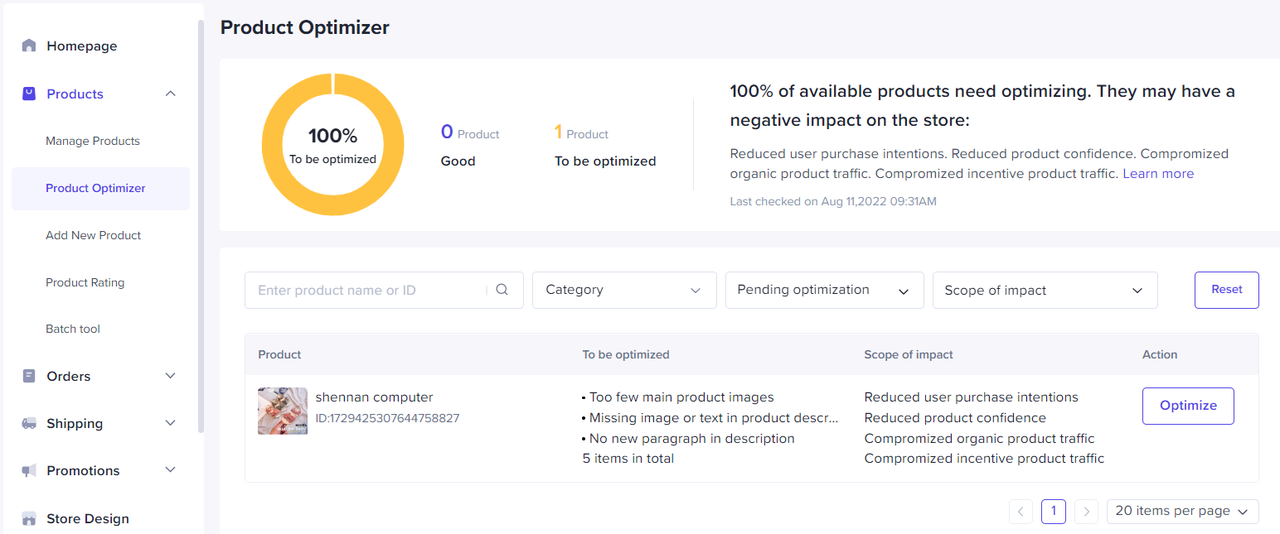
Step1:View product performance

  1. Displays the number and percentage of your products deemed to have high listing quality. Also displays remaining products that need optimising.
  2. Highlights the improvements after the product listing is optimized.
  3. Displays each item to be optimized, as well as the scope of impact if not addressed.
As a Seller, you can click 'Optimize Now' to navigate into the product editing page. You can also search using the following filters:
  • Product ID
  • Product Name
  • Category
  • Pending Optimization
Scope of ImpactClicking 'Reset' will remove any of the filters selected from the list above. image.png

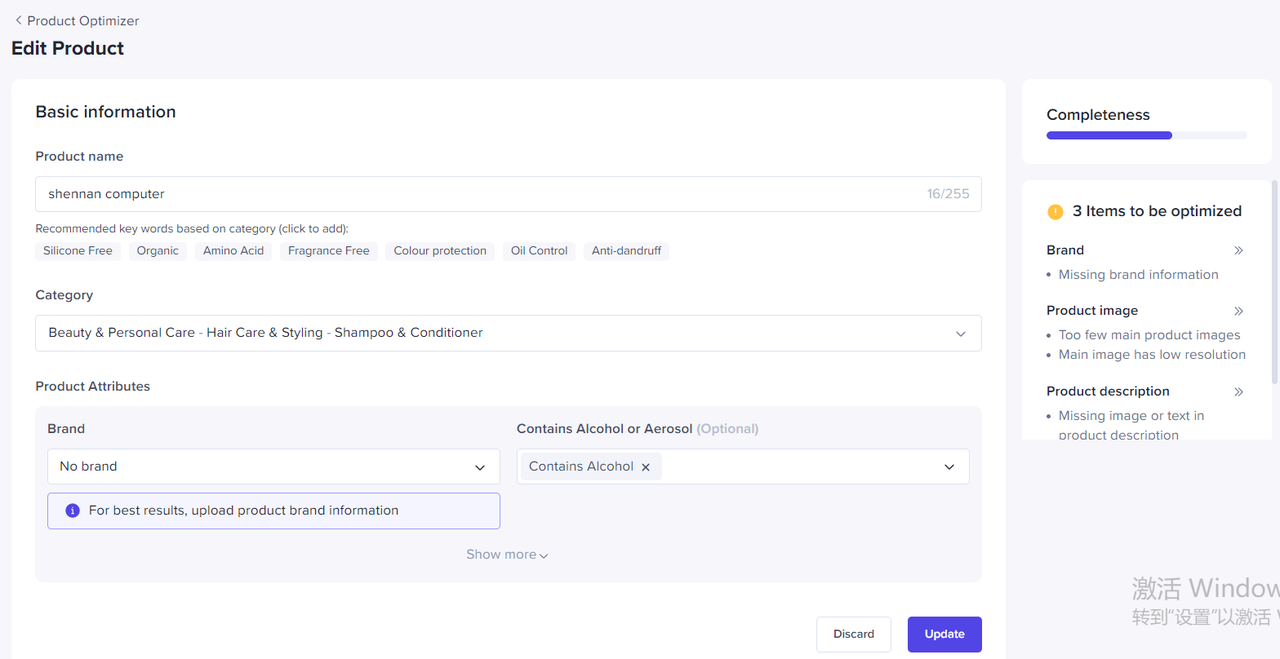
Step2:Check optimization and go to edit

  1. On the right side of the edit page, sellers can find the number of items that need optimizing and which actions to take.
  2. After completing the changes, click 'Update' to save edits. image.png

FAQ:

  1. How to fill in the product title?
The product title requires a minimum of 15 characters, while there is no restriction on flash sales. Newly released products have a text alert on the product release page. The products in stock won't be affected, but you're required to meet the conditions in the next edit before submission.
  1. How to fill in the product attributes?
It's recommended that sellers fill in the product attributes as detailed as possible, so as to present more complete product information to users. You can fill them in on the Edit Product page, or you can use the Batch Tool. We recommend all sellers to fill in as many product attributes as possible, to help buyers see more complete information about the product. You can update these attributes direct from the 'Manage Products' page, or upload in bulk using the Batch Tool.
  1. Any requirements for uploading product images?
We recommend all sellers to upload no fewer than three images of a product. Ensure you do not upload duplicate images, and that the resolution exceeds 300 x 300 pixels.